Calibrate your phone level on any table
A level app is only as good as its calibration. Loodis calibrates without a reference surface: it turns the phone around on the same spot, so the tilt of the table cancels out and only the error of the phone is left.
Why a phone level is off at first
The accelerometer in a phone is tiny and is mounted with a small error. Two phones of the same model can disagree by half a degree. On top of that:
- A case that is thicker at one end tilts the phone.
- A camera bump lifts one corner when the phone lies on its back.
- The sides of a phone are rounded, so it doesn't stand exactly upright on its edge.
That is why a level app that just reads the sensor can show 0.5–1° on a surface that is perfectly level.
The usual way – and its problem
Most level apps say: put the phone on a level surface and press Calibrate. But if you had a surface you knew was level, you wouldn't need a level app. Calibrating on a slightly tilted table builds that tilt into every later measurement.
How Loodis calibrates
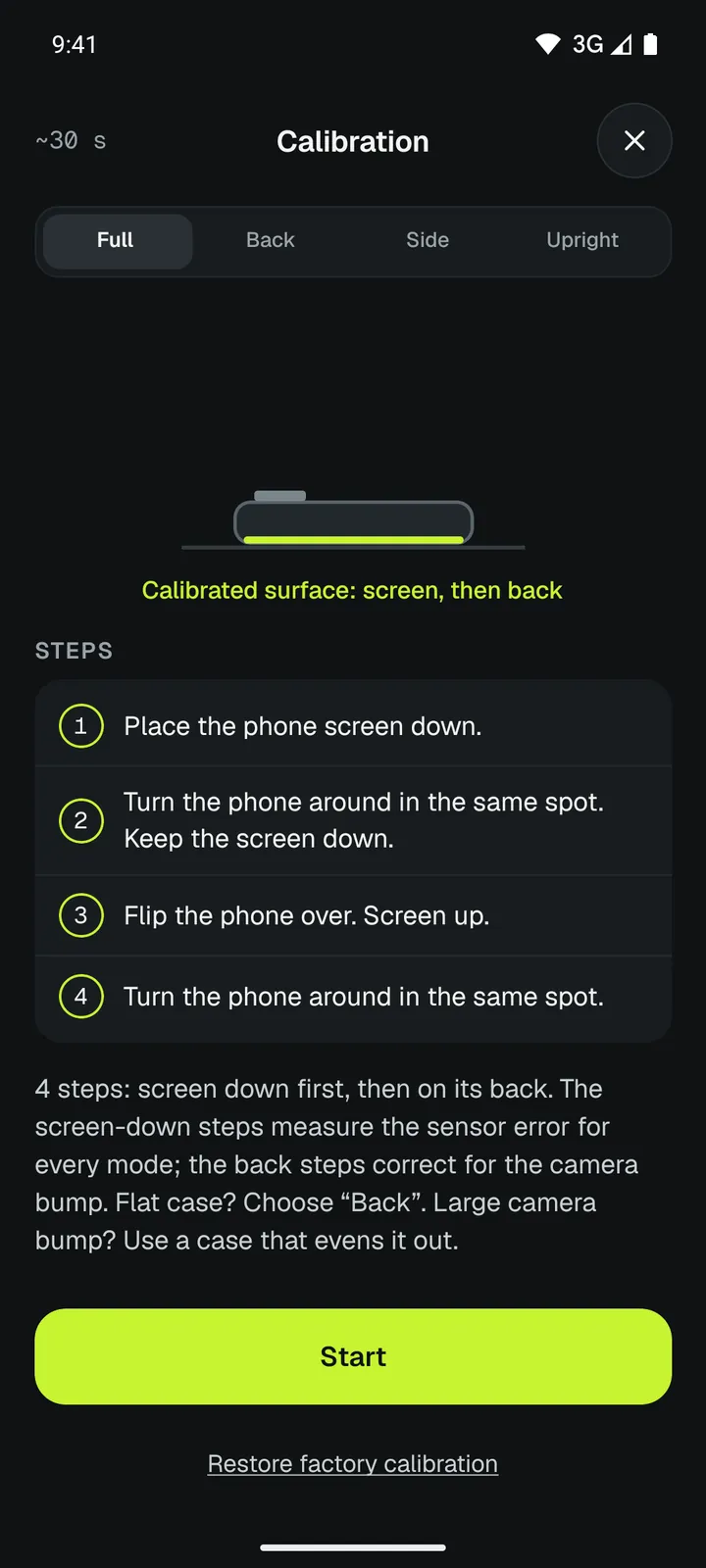
Loodis uses the trick builders use to check a spirit level: measure, turn it around 180° on the same spot, measure again. A real tilt of the table changes sign when the phone turns, the error of the phone does not. The average of the two readings is the phone's own error.
- Place the phone screen down on any stable table.
- Turn it around on the same spot. Keep the screen down.
- Flip the phone over, screen up.
- Turn it around on the same spot again.
Loodis checks every turn with the gyroscope, speaks each step aloud and tells you if the phone moved. The screen-down steps measure the sensor error for every mode; the back steps add the effect of the camera bump.
Calibrate the edges and upright position (Pro)
When you use the phone on its side or standing on its end, the rounded edges add their own error. With Pro you can calibrate each side and the upright position separately – again by turning the phone around on the same spot, so no level surface is needed.
Check that it worked
Put the phone on a table, note the reading, turn it around 180° on the same spot. After a good calibration both readings are the same number with opposite direction. If they are not, run the calibration again on a steadier surface.
Calibrate again after you put on a new case. You can always go back to the factory reading in the calibration screen.
Read next
How accurate is a phone level?
What limits a phone level, how calibration helps and a 30-second test.→How to level a shelf with your phone
Hang a shelf level and see how many millimetres to raise one end.→Frequently asked questions
Answers about Loodis: accuracy, calibration, cases and camera bumps, tablets, privacy, the free version and Loodis Pro.→Measure it with Loodis
Bubble level for Android. Calibrate on any table, read the tilt in degrees and try every Pro feature three times for free.